
-67%


Fast Shipping

100% Genuine Product

Whatsapp Support

Brand Warranty
Description
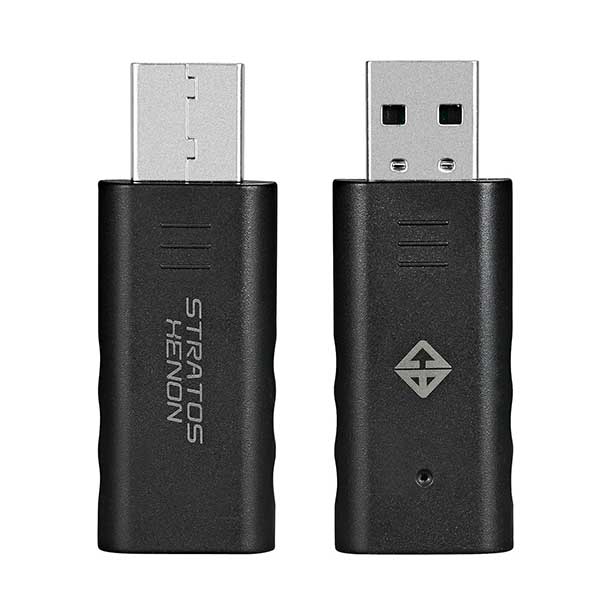
Cosmic Byte Stratos Xenon & Quantum Gamepad Dongle (Black)
Feature
- Cosmic Byte Stratos Xenon & Quantum Gamepad Dongle (Black) allows the Stratos Xenon or Quantum Gamepad to work with PC directly as X-input or D-input gamepad.
- Does not require third party software for the gamepad to work with PC.
- Works as any other windows gamepad.
- PAIRING THE DONGLE TO STRATOS XENON CONTROLLER FOR THE 1ST TIME ON PC Plug the dongle to the USB port of the PC. The Blue LED on the dongle will start blinking. Press the “Share + Home” button on the controller for 3 seconds, The white led light on the controller will blink 4-5 times before it turns to blue and connects with the dongle. The Blue LED on the dongle will stop blinking. The controller is now ready for use.
- CHANGING BETWEEN X-INPUT AND D-INPUT MODE Press the “Share + Options” button on the controller for 2 seconds to switch between X-input and D-input mode.

- Cosmic Byte Stratos Xenon & Quantum Gamepad Dongle (Black) for PC This dongle allows the Stratos Xenon and Quantum Gamepad to work with PC directly as X-input or D-input gamepad.
- Does not require third party software for the gamepad to work with PC.
- Works as Xbox windows gamepad.
PAIRING THE DONGLE TO STRATOS XENON/QUANTUM CONTROLLER FOR THE 1ST TIME ON PC
- Plug the Cosmic Byte Stratos Xenon & Quantum Gamepad Dongle (Black) to the USB port of the PC. The Blue LED on the dongle will start blinking.
- Press the “Share + Home” button on the controller for 3 seconds, The white led light on the controller will blink 4-5 times before it turns to blue and connects with the dongle.
- The Blue LED on the Cosmic Byte Stratos Xenon & Quantum Gamepad Dongle (Black) will stop blinking.
- The controller is now ready for use.
CHANGING BETWEEN X-INPUT AND D-INPUT MODE
- Press the “Share + Options” button on the controller for 2 seconds to switch between X-input and D-input mode.
Additional information
| Product Type | Normal |
|---|---|
| color | Black |
| Brands | Cosmic Byte |
| Connection Type | wireless |
| Warranty | 1 Year |
| EAN / UPC Code | 8906107601930 |
Reviews (0)
Only logged in customers who have purchased this product may leave a review.
Related Product

Cosmic Byte Firestorm RGB Wired Gaming Mouse with PTFE feet
Original price was: ₹1,499.00.₹849.00Current price is: ₹849.00. (Inclusive of GST)
Cosmic Byte Quantum Dual Mode Bluetooth + Wired Controller
Original price was: ₹5,999.00.₹2,399.00Current price is: ₹2,399.00. (Inclusive of GST)
Cosmic Byte ARES Wireless Controller for PC (White)
Original price was: ₹2,499.00.₹1,349.00Current price is: ₹1,349.00. (Inclusive of GST)
Cosmic Byte ARES Controller for PC
Original price was: ₹2,499.00.₹929.00Current price is: ₹929.00. (Inclusive of GST)

Reviews
Clear filtersThere are no reviews yet.